
 Culture and entertainment
 Supermarket
 Business and services
 Collectibles and art
 Home & garden
 Kids
Kids Electronics
 Computers
 Automotive
 Tools
Tools Fashion
 Sports & travel
 Phones & accessories
 Health & beauty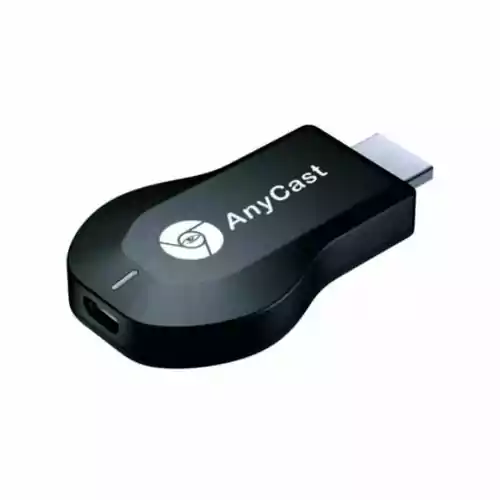
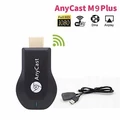
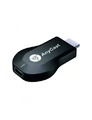

AnyCast M9 HDMI Dongle WiFi Display 1080P HD adapter
AnyCast M9 HDMI Dongle WiFi Display 1080P HD adapter www.KupCoChcesz.pl
Orders placed by 1:00 PM are shipped the same business day. U Ciebie pojutrze!
Availability: low stock
Dispatched within:
24 hours
Share: 


Opis
AnyCast M9 HDMI Dongle WiFi Display 1080P HD adapter.
Main features:
Stream photos, video and music from an Android smartphone, iPhone or tablet to a big TV or projector. Wi-Fi: 802.11b g n.
Wireless WiFi 2.4 GHz 150 Mb s.
Supports interactive multi-screen features such as AirMirror DLNA Miracast Airpaly.
Supports the vehicle's HDMI interface.
You can connect your phone to the car screen wirelessly to share navigation map information.
Supports synchronized audio and video playback.
Specifications:
Processor: Single Core ARM Cortex A9 Rockchip RK2928 1.2Ghz.
Operating system: Linux 3.0.8.
RAM: 256MB.
HDMI: 1x HDMI 1.4.
Power: 1x micro USB 5V DC 500mA min (5V 1A recommended).
Supported formats:
Video: MPEG4, MPEG2, WMV, MOV, MKV, RMVB, etc.
Audio: MP3, WAV, AAC, 3GP, etc. Photos: JPG, JPEG, GIF, PNG, BMP, etc.
Range: up to 10 m.
Compatibility: Android from 4.2 iOS from 7.0 Mac OS from 10.9 Windows Phone from 8.1.
Used product, wrapped in foil.
Package includes:
1 x AnyCast M9 HDMI Dongle WiFi Display 1080P HD adapter.
User manual
1. Connect the device to a free HDMI port on your TV, and connect power through the micro USB port with the included USB cable.
2. After connecting correctly and selecting the HDMI input on the TV, the ANYCAST start screen should appear in a mode waiting for a connection from a mobile device. A large "Waiting for connection" message should appear at the bottom.
3. Press the small mode selection button on the device – another screen should appear with information about the connection to the mobile device, the TV and WI-FI. At this point, crossed-out circles should appear between ANYCAST and the mobile device and the device broadcasting WIFI (e.g. a router).
4. Next, download a CODE SCANNER app to your smartphone or tablet to read the code from the screen.
5. Owners of phones other than Samsung or Apple should download the SCREEN MIRRORING ASSISTANT app by EasyToolsApps.
6. On the mobile device, select SETTINGS -> WIRELESS AND NETWORKS -> WIFI. "Anycast-symbol" should appear on the list, for example Anycast-cdf1b0. Disconnect from your current WIFI connection and connect to ANYCAST.
7. Select and enter the default password 12345678.
8. The device should pair with ANYCAST, and a WIFI signal icon should appear at the top of the screen.
9. At the same time, the symbol between the mobile device and ANYCAST disappears on the TV. If this does not happen, go back to step 3 (skipping steps 4 and 5) and repeat the procedure.
10. Use the code scanner to scan the large square graphic symbol at the top of the TV screen, and then select the "Open browser" icon.
11. Select the orange "make dongle connect to WIFI AP" icon.
12. Press the "SCAN" button and select an available WIFI connection. Enter the password for your WIFI device.
13. After entering the correct password, the last icon between ANYCAST and the device broadcasting WIFI should disappear on the TV. On the mobile device, press the green BACK icon.
14. Select the blue "Switch mode between Miracast and DLNA" icon.
15. A white page should appear on the mobile device and on the TV we should see a screen identical to the one in step 2.
16. Open the SCREEN MIRRORING ASSISTANT app by EasyToolsApps. In the upper right corner select the "Wireless display" option. Our ANYCAST will be on the list.
17. Now all that remains is to select this connection and wait about 20-30 seconds until a copy of our mobile device's display appears on the TV screen. You can display data from the phone and work over HSPA+, 3G and 4G.
18. If you have any problems with the device settings, you can restore factory settings by holding the mode selection button for about 5 seconds.
Used product.
Item checked and tested, fully functional, practically like new.
No packaging.
No manual.
Product reviews
Ask a question
We will send the answer to your e-mail address.
Similar products




Own this product?
Rate AnyCast M9 HDMI Dongle WiFi Display 1080P HD adapter and help others choose.
Add a reviewCustomer reviews (0)
This product has no reviews yet — yours could be the first.
Add a review
Sign your name and write a few sentences about the product.