
 Culture and entertainment
 Supermarket
 Business and services
 Collectibles and art
 Home & garden
 Kids
Kids Electronics
 Computers
 Automotive
 Tools
Tools Fashion
 Sports & travel
 Phones & accessories
 Health & beauty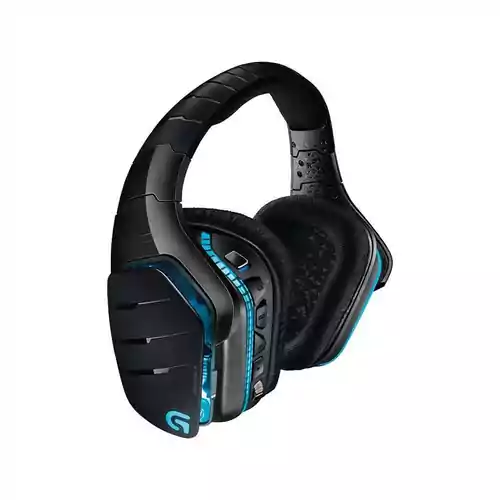







Logitech G933 Artemis Spectrum RGB 7.1 wireless gaming headset
Logitech G933 Artemis Spectrum RGB 7.1 wireless gaming headset www.KupCoChcesz.pl
Orders placed by 1:00 PM are shipped the same business day. U Ciebie we wtorek!
Availability: high stock
Dispatched within:
24 hours
Share: 


Opis
Logitech G933 Artemis Spectrum RGB 7.1 wireless gaming headset
Condition: used.
Enhanced sound from your favorite music to loud in-game audio. Pro-G drivers deliver clear and accurate highs and deep bass.
Play wirelessly or wired; play without lag on the 2.4 GHz wireless network for up to 12 hours on a single charge. Or use the 3.5 mm analog input without using the battery.
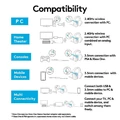
Multi-platform compatibility; the G933 is one headset for all devices. Move it from one game console to another and use it with mobile devices.
Fully customizable, use Logitech software to program lighting, sound and buttons. Adjustable RGB lighting lets you choose from up to 16.8 million colors. Customize your gaming headset.
Mixing audio from multiple sources; do not stop in the middle of a game to take a call. Answer and keep playing, play music and communicate in the game without having to pause the game.
Specifications:
Logitech Gaming Headset G933 Artemis Spectrum headset system - 7.1-channel, full-size, wireless.
Battery management. The G933 Artemis Spectrum wireless headset is powered by a battery located in the right ear cup. If you are not using the G933 Artemis Spectrum wireless headset, connect it via the USB port on the underside of the device to charge it. After a complete discharge, the battery needs about 3.5 hours to reach a full charge on a standard USB output. For the best experience, plug in the device and wait for a full charge before first use.
Logitech gaming software. The headset's home screen in the Logitech gaming software has a battery charge level indicator. When running on battery, it will show the charge level.
Critical battery warning. The Artemis Spectrum G933 gaming headset will play a low-charge tone. The headset lighting will also dim at a low charge level. At a critical charge level, the device will play a sound and the lighting will turn off. Use the USB cable to connect the headset immediately if you hear these sounds, to ensure uninterrupted listening or gaming.
Idle sleep mode. The G933 Artemis Spectrum will go into sleep mode to save battery power when it does not receive an audio signal within 5 minutes. In idle sleep mode, the device lighting will turn off and it will disconnect from the wireless USB adapter. To wake the headset from sleep mode, press any button on the device. The device will continue to use battery power at a reduced rate in idle sleep mode. If you plan to leave the headset idle for a longer time, turn the headset off and connect it via USB to charge.
Sounds and lights on off. When you turn the headset on, it will play a beep indicating that the headset has been turned on. The lights will run a light power-up sequence and then switch to the currently selected lighting. When the device is turned off, the lights will switch to blue and fade out while shutting down.
Legal disclaimers. The product is sourced and shipped from the European Economic Area (EEA). The product is a genuine original from the manufacturer's authorized distributors.
Package includes:
Logitech G933 Artemis Spectrum RGB 7.1 wireless gaming headset.
Used product. Item checked and tested, fully working, practically like new. No packaging. No instructions.
See also: Original USB headset adapter Logitech G430 (Logitech).
Product reviews
Ask a question
We will send the answer to your e-mail address.
Similar products














Own this product?
Rate Logitech G933 Artemis Spectrum RGB 7.1 wireless gaming headset and help others choose.
Add a reviewCustomer reviews (0)
This product has no reviews yet — yours could be the first.
Add a review
Sign your name and write a few sentences about the product.