
 Culture and entertainment
 Supermarket
 Business and services
 Collectibles and art
 Home & garden
 Kids
Kids Electronics
 Computers
 Automotive
 Tools
Tools Fashion
 Sports & travel
 Phones & accessories
 Health & beauty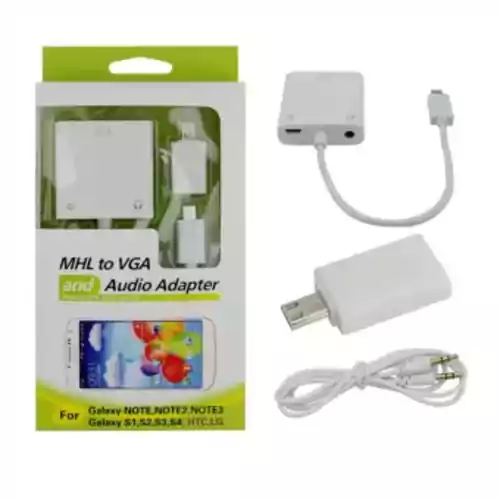

MHL Micro to VGA + Audio adapter converter
MHL Micro to VGA + Audio adapter converter www.KupCoChcesz.pl
Orders placed by 1:00 PM are shipped the same business day. U Ciebie pojutrze!
Availability: medium stock
Dispatched within:
24 hours
Share: 


Opis
MHL Micro to VGA + Audio adapter converter
This indispensable MHL Micro to VGA + Audio adapter, compatible with the Galaxy Note 2, 3, Galaxy S1, S2, S3, S4, HTC and LG, is a small and practical device that lets you use audio and video apps from your mobile phone on a big screen. If you are looking for excellent-quality wireless communication, this product is for you! The Micro USB MHL to VGA and Audio adapter is a great solution created by Love Technology. With it you can easily convert high-quality audio and video signals from your smartphone or tablet to a TV or projector screen.
Specifications:
The MHL Micro to VGA + Audio adapter lets you conveniently display photos and videos on a large TV or projector. Products requiring power can only be used with a 5V 1A power supply. It has an input: 1x Micro USB-shaped MHL socket (male), and an output: 1x female VGA socket + 3.5 mm line audio. It is also equipped with a female Micro USB socket for charging. The adapter is available in white, and its dimensions are approximately 5 x 4 x 1.7 cm (length * width * height).
Note:
It is important that the MHL be connected to an external power source (5V 1A or more) - otherwise there will be no VGA output. After connecting the MHL cable with power, you need to restart the phone to get the VGA output. The adapter has no MHL output settings. It supports HDTV output very well, but may not work with MHL output after a phone ROM update. It is compatible with the Samsung Galaxy S2 i9220 and HTC EVO AC68.
Follow the steps below to connect:
1. Connect one end of the VGA cable to the MHL adapter.
2. Connect the other end of the VGA cable to the TV or projector (VGA cable not included).
3. Insert the 3.5 mm cable into the line output and the other end into the TV.
4. Connect the original travel charger to the micro USB socket of the MHL adapter.
5. Connect the original travel charger to an approved power source.
6. Connect the MHL adapter connector to the phone.
7. Restart the phone and the picture should appear on the TV. Please note that the video and audio output may not work properly when connected via a docking station.
The set includes:
1 x MHL VGA adapter
The product is used, but it has been thoroughly checked and tested, is fully working, practically like new. No packaging or instruction manual.
See also: LOVE LIFE products.
Product reviews
Ask a question
We will send the answer to your e-mail address.
Similar products

Own this product?
Rate MHL Micro to VGA + Audio adapter converter and help others choose.
Add a reviewCustomer reviews (0)
This product has no reviews yet — yours could be the first.
Add a review
Sign your name and write a few sentences about the product.